From a hanger photo to an on-model product photo
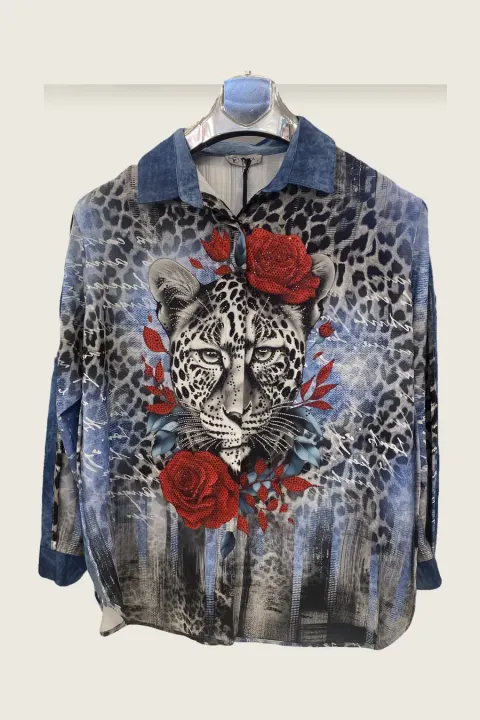
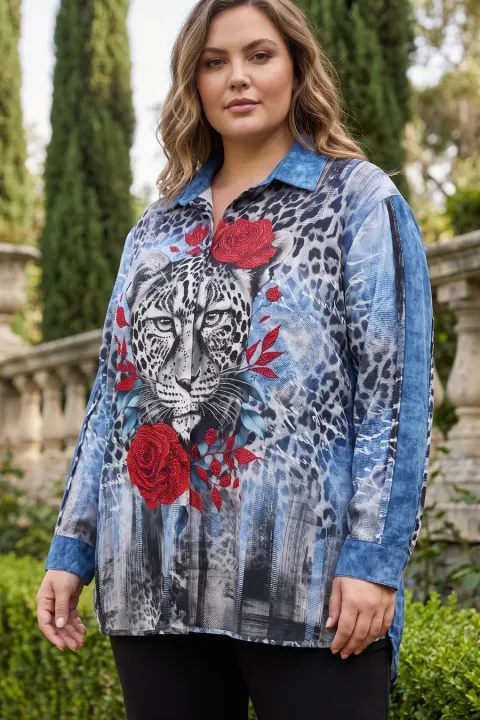
Most small clothing sellers shoot on a hanger because a model, a photographer and a studio day cost more than the first month of sales. Shoppers still click the listing that shows the garment on a person. vCabin closes that gap with the photo you already have.
You upload the garment as it is: on a hanger, laid flat or on a shop mannequin. The garment is cut out, read in detail (cut, closures, print placement, length) and drawn on a model you choose, in a studio or lifestyle scene. Adding a back or side photo lets it read those sides instead of guessing them.


Normal 10 cr (2K) · Pro 35 cr (4K) · about 60 s
How it works
- 01
Take one clear photo of the garment in daylight. Add the back photo if you want a back view.
- 02
Choose the model, body type, pose and scene.
- 03
Download the 2K (Normal) or 4K (Pro) image in about 60 seconds.
Frequently asked questions
- Does the photo need a white background?
- No. A plain wall helps, but the garment is cut out of any background before it is drawn on the model.
- Will the result be exactly my garment?
- It follows your photo, including closures and print placement. Fine text and small sequins can shift, so check the close-up and regenerate if a detail is wrong.
- Can I use a shop mannequin photo?
- Yes. Hanger, flat lay and shop mannequin photos all work.
Try it on your own product
Same account on iOS, Android and web; credits are only spent on shots you generate.